Quantity has a quality all its own. - Apocryphal; popularly attributed to Joseph Stalin
11.1 Chapter Overview
Fundamentals of parallel workloads, different mechanisms to distribute work: vectorization (SIMD), multi-threading, GPU, and multi-device workflows. Different programming models: map-reduce, arrays, and tasks.
11.2 Amdahl’s Law and the Limits of Parallel Computing
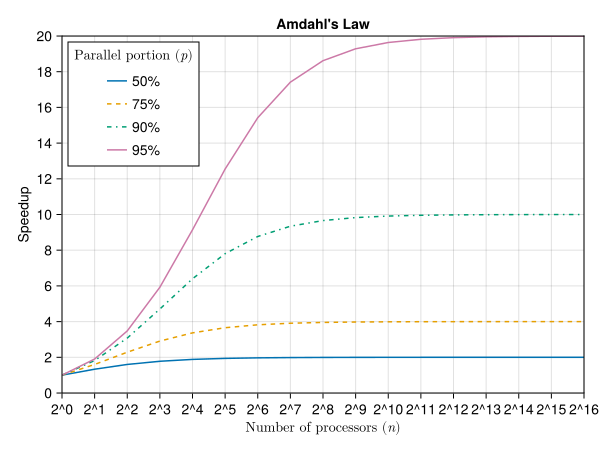
An important ground truth in computing is that there is an upper limit to how fast a workload can be sped up through distributing the workload among multiple processor units. For example, if there is a modeling workload wherein 90% of the work is independent (say policy or asset level calculations) and the remaining 10% of the workload is an aggregate (say company or portfolio level), then the theoretical maximum speedup of the process is 10x faster (1 / 10% serial load). This is captured in a law known as Amdahl’s Law, and it reflects the theoretical maximum speedup a workload could see. In practice, the speedup is worse than this due to overhead of moving data around, scheduling the tasks, and aggregating results. This is why in many cases a good effort in sequential workloads (see Chapter 10) is often a more fruitful effort than trying to parallelize some workloads.
That said, there are still many modeling use-cases for parallelization. Modern investment and insurance portfolios can easily contain hundreds of thousands or millions of seriatim holdings. In many cases, these can be evaluated independently, though often there is interaction with the total portfolio (contract dividends, non-guaranteed elements, profit sharing, etc.). Further, even if the holdings are not parallelizable across the holdings dimension, we are often interested in independent evaluations across economic scenarios, which is amenable to parallelization.
\[
S(n) = \frac{1}{(1-p) + \frac{p}{n}}
\]
Where:
\(S(n)\) is the theoretical speedup of the execution of the whole task
\(n\) is the number of processors
\(p\) is the proportion of the execution time that benefits from improved resources
We can visualize this for different combinations of \(p\) and \(n\) in Figure 11.1.
usingCairoMakiefunctionamdahl_speedup(p, n)return1/ ((1- p) + p / n)endfunctionmain() fig =Figure() ax =Axis(fig[1, 1], title="Amdahl's Law", xlabel=L"Number of processors ($n$)",ylabel="Speedup", xscale=log2, xticks=2.^ (0:16), xtickformat=x ->"2^".*string.(Int.(log.(2, x))), yticks=0:2:20 ) n =2.^ (0:16) parallel_portions = [0.5, 0.75, 0.9, 0.95] linestyles = [:solid, :dash, :dashdot, :dot]for (i, p) inenumerate(parallel_portions) speedup = [amdahl_speedup(p, ni) for ni in n]lines!(ax, n, speedup, label="$(Int(p*100))%", linestyle=linestyles[i])endxlims!(ax, 1, 2^16)ylims!(ax, 0, 20)axislegend(ax, L"Parallel portion ($p$)", position=:lt) figendmain()
Figure 11.1: Theoretical upper bound for speedup of a workload given the parallelizable portion \(p\) and number of processors \(n\).
A real-world analogy: imagine building a house. You can hire many workers to frame the walls, install plumbing, and run electrical wires simultaneously (the parallel part). However, all work must stop to wait for the single foundation to be poured and cured (the serial part). No matter how many workers you add, the total project time can never be faster than the time it takes to cure the foundation. This fundamental bottleneck is what Amdahl’s Law describes.
With this understanding, we will be able to set expectations and analyze the benefit of parallelization.
11.3 Types of Parallelism
Parallel processing comes in different flavors and is related to the details of hardware as discussed in Chapter 9. We will necessarily extend the discussion of hardware here, as parallelization is (mostly) inextricably tied to hardware details. We revisit this in Section 11.8 when we connect the techniques back to programming abstractions and real models.
Major types of computational parallelism highlighting their key characteristics, advantages, and potential drawbacks.
Type
Description
Strengths
Weaknesses
Vectorization (SIMD)
Performs same operation on multiple data points simultaneously
Efficient for data-parallel tasks, uses specialized CPU instructions
Limited to certain types of operations, data must be contiguous
Multi-Threading
Executes multiple threads concurrently on a single CPU
Good for task parallelism, utilizes multi-core processors effectively
Overhead from thread management, potential race conditions
GPU
Uses graphics processing units (GPUs) for parallel computations
Excellent for massively parallel tasks, high throughput
Specialized programming required, data transfer overhead
Multi-Device / Distributed
Spreads computation across multiple machines or devices
Scales to very large problems, can use heterogeneous hardware
Complex to implement and manage, network latency issues
11.4 Vectorization
Vectorization in the context of parallel processing refers to special circuits within the CPU wherein the CPU will load multiple data units (e.g. 4 or 8 floating point numbers) in a contiguous block and perform the same instruction on them at the same time. This is also known as SIMD, or Single-Instruction Multiple Data. Think of it like a for loop where each iteration does four or eight operations at a time instead of one.
The requirements for SIMD-able code are that:
The intended section for SIMD is inside the inner-most loop.
The loop body is type-stable and free of complex control flow: cross-iteration dependencies, early exits, and functions that cannot be inlined all prevent vectorization. (The compiler can often convert a simple branch, like the if in the example below, into a branchless “masked” operation.)
Reordering the iterations must not change the result — or the programmer must explicitly permit reordering, as discussed below.
Tip
Note that indexing an array actually introduces a branch in the code, as two cases could arise: the index is either inbounds or out-of-bounds. To avoid this, either use for x in collection, for i in eachindex(collection) or for i in 1:n; @inbounds collection[i], though the last of these is discouraged in favor of the prior, safer options.
usingBenchmarkToolsfunctionsum_positive(arr) s =zero(eltype(arr))for x in arrif x >0 s += xendendreturn sendfunctionsum_positive_simd(arr) s =zero(eltype(arr))@simdfor i ineachindex(arr) x = arr[i]if x >0 s += xendendreturn sendlet x =randn(10000)@btimesum_positive($x)@btimesum_positive_simd($x)end
In testing the above code, the sum_positive_simd version should be several times faster than sum_positive. Perhaps surprisingly, the branch is not the obstacle here: the compiler converts the simple if x > 0 into a branchless masked operation in both versions. What actually prevents sum_positive from vectorizing is the summation itself. Floating point addition is not associative — accumulating the elements four or eight at a time produces a (very slightly) different result than adding them one-by-one in order, and the compiler will not silently change the answer your code would produce. The @simd macro is our explicit permission to reorder the accumulation, which unlocks vectorization (enter ?@simd in the REPL for details, and see Section 24.9.4 for more).
Note
Note that the accumulator is initialized with zero(eltype(arr)) rather than the integer literal 0. With s = 0, the accumulator would start as an Int and only be promoted to Float64 once the first positive element is added, making the loop body type-unstable (see Chapter 10) — which by itself is enough to defeat vectorization and slow the loop several-fold, independent of any branching.
Other types of parallelism that we will discuss in this chapter have some risk of errors or data corruption if not used correctly. Automatic vectorization isn’t prone to issues like this, because the compiler only vectorizes code when it can prove the transformation does not change the result. Annotations shift that responsibility to the programmer, however. @simd is a promise to the compiler that iterations may be safely reordered — including reordering floating point reductions, which can change results in the last few digits — and applying it to a loop with cross-iteration dependencies can produce silently incorrect results. Third-party macros like @turbo (from LoopVectorization.jl) are more aggressive still and carry the same caveat (e.g., x[i] = x[i-1] inside the loop).
11.4.1 Hardware
Vectorization is hardware dependent. If the CPU does not support vectorization you will not see speedups from it. Many consumer and professional chips have AVX2 (Advanced Vector Extensions 2), which uses 256-bit registers allowing four simultaneous 64-bit floating-point operations. AVX-512, with 512-bit registers (eight simultaneous 64-bit operations), is common on Intel server chips and recent AMD processors. However, AVX-512 can cause thermal throttling on some chips—wider SIMD uses more power and generates more heat—so real-world speedups depend on sustained workloads and cooling.
On ARM processors (AArch64), the equivalent is NEON (128-bit, two 64-bit operations) and the newer SVE/SVE2 (Scalable Vector Extension) which supports variable-width vectors up to 2048 bits. Apple’s M-series chips use NEON; ARM server chips like AWS Graviton3 support SVE.
11.5 Multi-Threading
This subsection starts by introducing tasks - lightweight units of computation. Next, we will see how tasks can communicate using channels, and then how multiple tasks (and channels) can be leveraged to achieve true parallelism through multi-threading. Think of it as layers building on one another: tasks define work units, channels allow them to share data, and multi-threading enables tasks to run simultaneously on multiple CPU cores. Exact details regarding tasks, channels, and multi-threading vary by language but the general ideas remain the same.
11.5.1 Tasks
To understand multi-threading examples, we first need to discuss Tasks, which are chunks of computation that get performed together, but after which the computer is free to switch to a new task. Technically, there are some instructions within a task that will let the computer pause and come back to that task later (such as sleep).
Tasks do not, by themselves, allow for multiple computations to be performed in parallel. For example, one task might be loading a data file from persistent storage into RAM. After that task is complete, the computer continues on with another task in the queue (rendering a web page, playing a song, etc.). In this way even a single processor computer could be “doing multiple things at once” (or “multi-tasking”) even though nothing is running in parallel. The scheduling of the tasks is handled automatically by the language runtime or the operating system.
Here’s an example of a couple of tasks where we write to an array. Despite being called last, the second task should actually write to the array before the first task. This is because we asked the first task to sleep (pause, while allowing the computer to yield to other tasks in the queue)1.
Channels are a way to communicate data in a managed way between tasks. You specify a type of data that the buffer (a chunk of assigned memory) will contain and how many elements it can hold. It then stores items (via put!) in a first-in-first-out (FIFO) queue, which can be popped off the queue (via take!) by other tasks.
Here’s an example of a system which generates trades in the financial markets at random time intervals, and a monitoring task takes the results and tabulates running statistics:
let# simulate random trades and the associated profits functiontrade_producer(channel, i)1sleep(rand())2 profit =randn()put!(channel, profit)println("Producer: Trade Result #$i$(round(profit, digits=3))")end# intake trades via the communication channelfunctionportfolio_monitor(channel, n) sum =0.03for _ in1:n profit =take!(channel) sum += profit p =round(profit, digits=3) s =round(sum, digits=3)println("Monitor: Received $p, Cumulative: $s")endend4 channel =Channel{Float64}(32)# Start producer and consumer tasks5@syncbeginfor i in1:56@asynctrade_producer(channel, i)end@asyncportfolio_monitor(channel, 5)end# Close the channel and wait for tasks to finishclose(channel)end
1
Random sleep between 0 and 1 seconds to simulate real trading activity and latency.
2
Generate a random number from standard normal distribution to simulate profit or loss from a trade.
3
In this teaching example, we’ve limited the system to produce just five “trades”. In practice, this could be kept running indefinitely via, e.g., while true.
4
Create a channel with a buffer size of 32 floats (in this limited example, we could have gotten away with just 5 since that’s how many the demonstration produces). In practice, you want this to be long enough that the consumer of the channel never gets so far behind that the channel fills up. The channel is created outside of the @sync block so that channel is in scope when we close it.
5
@sync waits (like wait(task)) for all of the scheduled tasks within the block to complete before proceeding with the rest of the program.
6
@async does the combination of creating a task via @task and schedule-ing in one, simpler call.
Producer: Trade Result #1 -0.264
Monitor: Received -0.264, Cumulative: -0.264
Producer: Trade Result #4 -1.986
Monitor: Received -1.986, Cumulative: -2.25
Producer: Trade Result #3 1.865
Monitor: Received 1.865, Cumulative: -0.385
Producer: Trade Result #5 -0.564
Monitor: Received -0.564, Cumulative: -0.949
Producer: Trade Result #2 0.661
Monitor: Received 0.661, Cumulative: -0.288
This is really useful for handling events that are “external” to our program. If we were just doing a modeling exercise using static data, then we could control the order of processing and not need to worry about monitoring a volatile source of data. Nonetheless, tasks can still be useful in some cases even if a model is not using “live” data: for example if one of the steps in a model is to load a very large dataset, it may be possible to perform some computations while chunked task requests are queued to load more data from the disk.
A garbage collector will usually clean up unused channels that are still open. However, it’s a good practice to explicitly close them to ensure proper resource management, clear signaling of completion, and to avoid potential blocking or termination issues in your programs.
Caution
If the task never finishes properly inside the @sync, then your program may get stuck in an infinite loop and hang. Such as if one of the tasks never has a termination condition such as an upper bound on a loop, or a clear way to break out of a while true loop. While not different than a normal loop, such issues become less obvious underneath the layer of task abstractions.
The key takeaway for tasks is that it’s a way to chunk work into bundles that can be run in a concurrent fashion, even if nothing is technically being processed in parallel. The multi-threading and parallel programming paradigms sections build off of tasks so an understanding of tasks is helpful. However, some of the higher level libraries hide the task-based building blocks from you as the user/developer and so an intricate understanding of tasks is not required to be successful in parallelizing your Julia code.
11.5.2 Multi-Threading Overview
When a program starts on your computer, the operating system creates a process. It allocates bookkeeping structures (to track code, stack frames, and heap allocations) and reserves a block of memory in RAM for that process. Different processes do not have access to each other’s allocated memory.
Note
Readers may be familiar with starting Excel in different processes. When workbooks are opened within the same process (e.g. when creating a new workbook from Excel’s File menu), the workbooks may seamlessly talk to each other (copy and paste from one to another). However, when Microsoft Excel is opened in different processes, then the workbooks in each respective process do not share memory and cannot create links or use full copy/paste functionality between them (this is what happens when you hold the control button and open Excel multiple times).
Within each process a main thread is created. That thread is where the running of the code occurs. For the level of the discussion here, you can think of a process as a container with shared memory for threads, which do the real work (as illustrated in Figure 11.2). Besides the main thread, other threads can be created within the process and access the same shared memory.
Tip
Set the number of Julia threads explicitly via the JULIA_NUM_THREADS environment variable or the --threads flag (for example, julia --threads=auto). This must be done before the session starts; changing it inside a running REPL has no effect.
Figure 11.2: When a program starts, the operating system creates a process for which multiple threads (a main thread plus optional additional threads) share memory.
The advantage of threads is that within a single physical processor there may be multiple cores. Those cores can access the shared process memory and run tasks from different threads simultaneously. Modern processors commonly have 8-16 cores (consumer) or 64-128+ cores (server), making multi-threading an effective way to utilize available hardware.
Note
Thread jargon varies. A compact glossary to help:
Hardware threads are the execution lanes exposed by the CPU. They are what the operating system schedules on each core.
Operating-system threads are managed by the kernel, which schedules them onto the available hardware threads. They are heavier to create and destroy than Julia tasks.
Green threads, cooperative threads, fibers, or user threads are Julia’s lightweight tasks. They live entirely inside the Julia runtime and can be created in large numbers with minimal overhead.
Multi-tasking is a single core rapidly switching between tasks so multiple activities appear to make progress even without true parallel execution.
Parallelism occurs at many layers - hardware, operating system, language runtime, and network - and the terminology is often overloaded. When collaborating, be explicit about which kind of “thread” you mean.
11.5.2.1 Multi-Threading Pitfalls
Different threads being able to access the same memory is a double-edged sword. It is useful because we do not need to create multiple copies of the data in RAM or in the cache2 and can improve the overall throughput of our usually memory-bandwidth-limited machines. The downside is that if we are mutating the shared data that our program relies upon, then our program may produce unintended results if the modification occurs carelessly. There are a couple of related issues to be aware of:
11.5.2.1.1 Race Conditions
The first issue is known as a race condition, which occurs when a block of memory has been read from or written to in an unintended order. For example, if we have two threads which are accumulating a sub-total, each process may read the running sub-total before the other thread has finished its update.
In the following example, we use the Threads.@threads to tell Julia to automatically distribute the work across threads.
functionsum_bad(n) subtotal =0Threads.@threadsfor i in1:n subtotal += iend subtotalendsum_bad(100_000)
50745531
The result will be less than the expected sum (5000050000) due to a race condition. Here’s what happens:
Multiple threads read the current value of subtotal simultaneously.
Each thread adds its own, local value to that reading.
One thread writes its result back to subtotal first.
A different thread then overwrites subtotal with its calculation based on the out-dated starting point for subtotal.
This means some thread contributions are lost when they overwrite each other’s results. The threads may not see each other’s updates, leading to missing values in the final sum.
11.5.2.2 Avoiding Multi-threading Pitfalls
We will cover several ways to manage multi-threading race conditions, but it is the recommendation of the authors to primarily utilize higher level library code, which will be demonstrated after covering some of the more basic, manual techniques.
11.5.2.2.1 Chunking up work into single-threaded work
First, let’s level-set with a single-threaded result:
functionsum_single(a) s =0for i in a s += iend send@btimesum_single(1:100_000)
1.500 ns (0 allocations: 0 bytes)
5000050000
Note that in the single-threaded case, Julia is able to identify this common pattern and use a shortcut, calculating the sum of the integers \(1\) through \(n\) as \(\frac{n(n+1)}{2}\) through a compiler optimization and essentially avoid the loop entirely.
We can implement a correct threaded version by splitting the work into different threads, each of which is independent. Then, we can aggregate the results of each of the chunks.
functionsum_chunker(a)1 chunks =Iterators.partition(1:a, a ÷Threads.nthreads())2 tasks =map(chunks) do chunkThreads.@spawnsum_single(chunk)end3 chunk_sums =fetch.(tasks)4returnsum_single(chunk_sums)end@btimesum_chunker(100_000)
1
Split 1:a into roughly equal ranges across available threads.
2
Launch a task for each chunk to compute a single-threaded sum.
3
Fetch each task’s result once it finishes.
4
Aggregate the partial sums on a single thread; this is cheap because there are only as many partial sums as threads.
5.458 μs (72 allocations: 4.16 KiB)
5000050000
11.5.2.2.2 Using Locks
Locks prevent memory from being accessed from more than one thread at a time.
functionsum_with_lock(n)1 subtotal =02 lock =ReentrantLock()3Threads.@threadsfor i in1:n4Base.@lock lock begin subtotal += iendend subtotalend@btimesum_with_lock(100_000)
1
Initialize a running total to zero.
2
Create a reentrant lock to ensure only one thread updates subtotal at a time.
3
Parallelize the loop over 1 to n using Threads.@threads.
4
Acquire the lock before updating the shared variable subtotal. This ensures that only one thread updates subtotal at a time, preventing race conditions. The lock is automatically released at the end of the block.
5.723 ms (199514 allocations: 3.05 MiB)
5000050000
11.5.2.2.3 Using Atomics
Atomics are certain primitive values with a reduced set of operations for which Julia and the compiler can automatically create thread-safe code. This is often significantly faster than the context-switching overhead needed with locking and unlocking memory for threaded tasks. Compared with locks, atomics are simpler to implement and easier to reason about. The downside is that atomics are limited to the available primitive atomic types and methods.
functionsum_with_atomic(n)1 subtotal =Threads.Atomic{Int}(0)Threads.@threadsfor i in1:n2Threads.atomic_add!(subtotal, i)end subtotal[]end@btimesum_with_atomic(100_000)
1
Initialize an atomic integer (Threads.Atomic{Int}) to store the subtotal. An atomic variable ensures that increments are performed atomically, preventing race conditions without needing explicit locks.
2
Atomically add i to subtotal. The Threads.atomic_add! function ensures that the addition and update of subtotal happens as one atomic step, preventing multiple threads from interfering with each other’s updates.
1.297 ms (53 allocations: 3.75 KiB)
5000050000
11.6 GPUs and TPUs
11.6.1 Hardware
Graphics Processing Units (GPUs) and Tensor Processing Units (TPUs) are hardware accelerators for massively parallel computations. A TPU is very similar to a GPU but has a special ability to handle data types and instructions that are more specialized for linear algebra operations; going forward we will simply refer to these types of accelerators as GPUs.
GPUs have similar components as the CPU as discussed in Chapter 9. They have RAM, caches for the cores, and cores that run the coded instructions on the data. The differences from a CPU are primarily:
A GPU typically has thousands of simple cores, while CPUs have fewer but more sophisticated cores (4-16 on consumer chips, up to 128+ on server chips like AMD EPYC or Intel Xeon).
GPU cores operate at slower clock speeds than CPU cores (1-2 GHz vs 3-5 GHz) but achieve throughput through massive parallelism.
The GPU cores essentially have to be running the same set of instructions on all of the data, not unlike vectorization (Section 11.4).
GPU code is not suited for code with branching conditions (e.g. if statements) and so is more limited in the kinds of computations it can handle compared to the CPU.
GPU memory (VRAM) is typically more constrained than system RAM. Consumer GPUs have 8-24 GB; high-end data center GPUs (NVIDIA H100) have up to 80 GB, while system RAM can easily be 128-512 GB on servers.
As a result, GPUs may need strategies to move chunks of data to and from GPU memory for large datasets. Using lower-precision datatypes (e.g., Float16 or Float32 instead of Float64) is common to fit more data and improve throughput, though this trades off numerical precision.
The caches are similar in concept to CPU, but unlike most CPU caches, there is relative locality to data (wherein core #1 will have much quicker access to a different subset of data than, say, core #1024).
A GPU is usually a secondary device of sorts: it physically and in device architecture is separate from the CPU. The CPU remains in charge of overall computer execution.
The implication of this (as with any movement of memory) is that there is overhead to moving data to and from the GPU. Your calculations will need to be in the single milliseconds range of time in order to start to see benefit from utilizing a GPU.
To some extent, separable CPU, RAM, and GPU are changing with some of the latest computer hardware. For example, the M-series of Apple processors have the CPU, GPU, and RAM in a single tightly integrated package for efficiency and computational power.
11.6.1.1 Notable Vendors and Libraries
Like the difference between x86 and ARM architectures, GPUs also have specific architectures which vary by the vendor. To make full use of the hardware, the vendors need to (1) provide device drivers which allow the CPU to talk to the GPU, and (2) provide the libraries (lower level application programming interfaces, or APIs) which allow developers to utilize different hardware features without needing to write machine code.
As of the mid 2020s, here are the most important GPU vendors and the associated programming library for utilizing their specific hardware:
GPU and TPU vendors with representative hardware and programming interfaces. NVIDIA dominates the data center market; Apple Metal is only available on macOS/iOS.
Radeon (consumer), Radeon Pro (professional), Instinct MI series (data center)
ROCm (HIP)
Intel
Arc (consumer), Data Center GPU Max / Ponte Vecchio (data center)
oneAPI (SYCL)
Apple
M-series integrated GPU (M1, M2, M3, M4)
Metal
Google
TPU v4, v5 (cloud only)
XLA (via JAX or TensorFlow)
11.6.2 Utilizing a GPU
With some of the key conceptual differences between CPUs and GPUs explained, let’s explore how to incorporate these powerful hardware accelerators. We will use Julia libraries to illustrate GPU programming, though the concepts are generally applicable to other high-level languages that offer GPU interface libraries.
11.6.2.1 Julia GPU Libraries
There are essentially two types of GPU programming we will discuss here:
Array-based programming, where arrays are stored and operated on directly on the GPU memory. This approach abstracts away the low-level details, allowing you to work with familiar array operations that are automatically executed on the GPU.
Custom kernels, which are specialized functions that define exactly how each GPU thread should process data in parallel. A kernel explicitly specifies the computation that each GPU thread will perform on its portion of the data.
Note
Kernels in this context are specialized functions that run directly on the GPU. Rather than relying solely on high-level array operations, kernels explicitly define the sequence of low-level, parallel instructions executed across many GPU threads. In other words, a kernel directly expresses the computation you want to perform on the data, enabling fine-grained control over GPU execution.
A third approach would be to implement GPU code in a low-level vendor toolkit (such as C++ and associated CUDA libraries), but this approach will not be illustrated here.
Julia has wonderful support for several of the primary vendors (at the time of writing, CUDA, Metal, OneAPI, and ROCm) via the JuliaGPU organization. Installation of the required dependencies is also very straightforward and the interfaces at the array and generated kernel levels are very similar. The differences are obvious at the lower level vendor-API wrappers (which is the lower-level technique that will not be covered here).
The benefit of the consistency of the higher level libraries we will use here is that examples written for one of the types of accelerators will be largely directly translatable to another. This is especially true for array programming, though less so for the kernel style as architecture-specific considerations often creep in3.
Note
This book will be rendered on a Mac and therefore the examples will use Metal in order to run computational cells, however we’ll show a CUDA translation for some of the examples in order to show how straightforward translating higher level GPU code in Julia is.
GPU API
GPU Array Type
Kernel Macro
CUDA
CuArray
@cuda
Metal
MtlArray
@metal
oneAPI
oneArray
@oneAPI
ROCm
ROCArray
@roc
11.6.2.2 Array Programming on the GPU
First described in Section 6.5, array programming eschews writing loops and instead favors initializing blocks of heap-allocated memory and filling it with data to be operated on at a single point in time. While this is often not the most efficient way to utilize CPUs, it’s essentially the required style of code to utilize GPUs.
For the example below, we will calculate the present value of a series of cashflows across a number of different scenarios. An explanation of the code is given below the example.
usingMetal1functioncalculate_present_values!(present_values, cashflows, discount_matrices)# Perform element-wise multiplication and sum along the time dimension2 present_values .=sum(cashflows .* discount_matrices, dims=1)end# Example usage using 100 time periods, 100k scenariosnum_scenarios =10^5pvs =zeros(Float32, 1, num_scenarios)3cashflows =rand(Float32, 100)4discount_matrices =rand(Float32, 100, num_scenarios)# copy the data to the GPUpvs_GPU =MtlArray(pvs)5cashflows_GPU =MtlArray(cashflows)discount_matrices_GPU =MtlArray(discount_matrices)@btimecalculate_present_values!($pvs, $cashflows, $discount_matrices)6@btime Metal.@synccalculate_present_values!($pvs_GPU, $cashflows_GPU, $discount_matrices_GPU)
1
The function calculate_present_values! is written the same way as if we were just writing CPU code. Note that we are also passing a pre-allocated vector, present_values to store the result. This will allow us to isolate the performance of the computation, rather than including any overhead of allocating the array for the result.
2
The code is broadcasted across the first dimension so that the single set of cashflows is discounted for each scenario’s discount vector.
3
Metal only supports 32-bit floating point (Float32) in GPU shaders. NVIDIA data center GPUs (A100, H100) have full-speed FP64; consumer GPUs (RTX series) have heavily throttled FP64 (often 1/64th the FP32 rate). For financial calculations requiring double precision, this is an important hardware consideration.
4
Using 100 thousand scenarios for this example.
5
MtlArray(array) will copy the array values to the GPU.
6
Note that the data still lives on the GPU and is of the MtlMatrix type (an alias for a 2-D MtlArray). Also note the Metal.@sync: GPU operations are launched asynchronously, so we must wait for the GPU to actually finish its work — without it, the benchmark would mostly measure the cost of queueing the work rather than performing it.
  1.098 ms (6 allocations: 38.55 MiB)
  1.802 ms (196 allocations: 6.95 KiB)
The testing suggests significantly faster computation when performed on the GPU (the exact speedup depends on hardware and problem size). Note, however, that this does not include the overhead of (1) moving the data to the GPU (in the initial MtlArray(cashflows) call), or (2) returning the data to the CPU (since the return type for the GPU version is MtlArray). We can measure this overhead by wrapping the data transfer inside another function and benchmarking it:
functionGPU_overhead_test(present_values, cashflows, discount_matrices) pvs_GPU =MtlArray(present_values) cashflows_GPU =MtlArray(cashflows) discount_matrices_GPU =MtlArray(discount_matrices)calculate_present_values!(pvs_GPU, cashflows_GPU, discount_matrices_GPU)Array(pvs_GPU) # convert to CPU arrayend@btimeGPU_overhead_test($pvs, $cashflows, $discount_matrices)
With the additional overhead, the computation on the GPU takes more total time than if the work were done just on the CPU. This is a very simple example, and the balance tips heavily in favor of the GPU when:
The computational demands are significantly higher (e.g. we were to do more calculations than just a simple multiply/divide/sum).
The data size grows bigger.
Note
The previous example can be translated to CUDA by simply exchanging MtlArray for CuArray.
Warning
This example again underscores that hardware parallelization is not an automatic “win” for performance. A lot of uninformed discussion around modeling performance is to simply try to get things to run on the GPU and it is often not the case that the models will run faster. Further, as the modeling logic gets more complex, it does require greater care to keep in mind GPU constraints (acceptable data types, memory limitations, avoiding scalar operations, data transfer between CPU and GPU, etc.). A best practice is to contemplate sequential performance and memory usage before leveraging GPU accelerators.
11.6.2.3 Kernel Programming on the GPU
Another approach to GPU programming is often referred to as kernel programming, or being much more explicit about how a computation is performed. This is as opposed to the declarative approach in the array-oriented style (Section 11.6.2.2) wherein we specified what we wanted the computation to be.
The key ideas here are that we need to manually specify several aspects which came ‘free’ in the array-oriented style. The tradeoff is that we can be more fine-tuned about how the computation leverages our hardware, potentially increasing performance.
The GPU libraries in Julia abstract much of the low level programming typically necessary for this style of programming, but we still need to explicitly look at:
How the GPU will iterate across different cores/threads.
How many threads to utilize, the optimal number depends on the shape of the computation (long vectors, multi-dimensional arrays), memory constraints, and hardware specifics.
GPU threads: Individual units of execution within a kernel. Each thread runs the same kernel code but operates on a different portion of the data.
How to chunk (group) the data to distribute the data to the different GPU threads
Our strategy for the present values example will be to distribute the work such that different GPU threads are working on different scenarios. Within a scenario, the loop is a very familiar approach: initialize a subtotal to zero and then accumulate the calculated present values.
As the work is distributed across threads, thread_position_in_grid_1d() will give the index of the current thread so that we can index data appropriately for the work as we decide to split it up (we’ve split up the work by scenario in this example).
2
The launch configuration below rounds the thread count up to a whole number of threadgroups, so a few trailing threads will receive an idx beyond the number of scenarios; the bounds check keeps them from reading or writing out of bounds.
3
Recall that we are working with Float32 on the GPU here, so the zero value is set via the f0 notation indicating a 32-bit floating point number.
4
The loop is across timesteps within each thread, while the thread index is tracked with idx.
5
The result is written to the pre-allocated array of present values, and we avoid race conditions because the different threads are working on different scenarios.
6
We don’t explicitly have to return nothing here, but it makes it extra clear that the intention of the function is to mutate the present_values array given to it. This mutation intention is also signaled by the ! convention in the function name.
calculate_present_values_kernel! (generic function with 1 method)
The kernel above was fairly similar to how we might write code for CPU-threaded approaches, but we now need to specify the technicals of launching this on the GPU. The threads argument defines how many threads run within each threadgroup; threads in the same group execute together, can share fast threadgroup memory, and can synchronize with one another, and the maximum group size depends on the hardware used. The groups argument defines how many such groups are launched — together, threads × groups determines the total number of GPU threads. The push-pull here is that threads that can share data avoid needing to create duplicate copies of that data in memory. However, if there is variability in how long each calculation will take, then the waiting time for synchronizing results may slow the overall computation down.
Through some experimentation in advance, we find that a relatively large group size of ~512 works well for this kernel.
We bring this all together through the use of the kernel macro @metal:
threads =512groups =cld(num_scenarios, threads)@btime Metal.@sync@metal threads =$threads groups =$groups calculate_present_values_kernel!($pvs_GPU,$cashflows_GPU,$discount_matrices_GPU);
232.792 μs (42 allocations: 1.12 KiB)
The kernel version is faster than the array-oriented style above (and thus also significantly faster than the CPU version). However, we saw previously that the cost of moving the data to the GPU memory and then back to the CPU memory was the biggest time sink of all - again we’d need to have more scale in the problem to make offloading to the GPU beneficial overall.
Note
The Metal GPUs are able to iterate threads across three different dimensions. In the prior example, we only used one dimension and thus used thread_position_in_grid_1d(). If we were distributing the threads across, say, two dimensions then we would use thread_position_in_grid_2d().
How do you determine how many dimensions to use? A good approach is to mimic the data you are trying to parallelize. In the example of calculating a vector of present values across 100k scenarios, that was the primary ‘axis of parallelization’. If instead of a one-dimensional set of cashflows (e.g. a single asset with fixed cashflows), we had a two-dimensional set of cashflows (e.g. a portfolio of many assets), then we may find the best balance of code simplicity and performance to iterate across two dimensions of threads (but we are still limited by the same number of total available threads).
Note
The above example would be translated to CUDA by changing a few things:
The thread indexing would be idx = (blockIdx().x - 1) * blockDim().x + threadIdx().x instead of idx = thread_position_in_grid_1d().
The GPU arrays should be created with CuArray instead of MtlArray.
The kernel macro would be @cuda threads=threads blocks=blocks calculate_present_values_kernel!(...) instead of @metal threads=threads groups=groups calculate_present_values_kernel!(...).
As in the Metal version, the kernel needs a bounds check (if idx <= ...) because threads × blocks will typically overshoot the data size. For example, cld(100_000, 1024) gives 98 blocks, launching 100,352 threads for only 100,000 scenarios.
Multiple device, or multi-device, computing refers to using separate groups of memory/processor combinations to accomplish tasks in parallel. This can be as simple as multiple distinct cores within a single desktop computer, or many separate computers networked across the internet, or many processors within a high performance cluster or a computing-as-a-service provider like Amazon Web Services or JuliaHub.
Everything discussed previously related to hardware (Chapter 9, Section 11.5, Section 11.6) continues to apply. The additional complexity is attempting to synchronize the computation across multiple sets of the same (homogeneous) or different (heterogeneous) hardware.
As you might imagine, approaches to multi-device computing can vary widely. Julia’s approach tries to strike the balance between capability and user-friendliness and uses a primary/worker model wherein one of the processors is the main coordinator while other processors are “workers”. If only one processor is started, then the main processor is also a worker processor. This main/worker approach uses a “one-sided” approach to coordination. The main worker utilizes high level calls and the workers respond, with some of the communication and hand-off handled by Julia transparently from the user’s perspective.
A useful mental model is the asynchronous task-based concepts discussed in Section 11.5.1, as the main worker will effectively queue work with the worker processors. Because there may be a delay associated with the computation or the communication between the processors, the worker runs asynchronously.
Description
Task API
Distributed Analogue
Create a new task
Task()
@spawnat
Run task asynchronously
@async
@spawnat
Retrieve task result
fetch
fetch
Wait for task completion
@sync
@sync
Communication between tasks
Channel
RemoteChannel
Adapting the trade producer and monitor example from above to run on multiple processors (see Section 11.5.1.1 to review the base model and algorithm), we make a few key changes:
using Distributed loads the Distributed standard Julia library, providing the interface for multi-processing across different hardware.
addprocs(n) will add n worker processes (before any workers are added, the main process acts as the sole worker, which is why we check nworkers() == 1 below). This starts new Julia processes (you can see this in the task manager of the machine) which inherit the package environment (i.e. Project.toml and environment variables) from the main process; this does not occur automatically if not part of the same local machine.
To add processors from other machines, see the Distributed Computing section of the Julia docs.
myid() is the identification number of the given process that’s been spun up.
We use a RemoteChannel instead of a Channel to facilitate communication across processors.
Instead of @async, we use @spawnat n to create a task for process number n (or :any will automatically assign a process).
usingDistributed# Add worker processes if not already addedifnworkers() ==1addprocs(4) # Add 4 worker processesend@everywhereusingRandom@everywherefunctiontrade_producer(channel, i)sleep(rand()) profit =randn()put!(channel, profit)println("Producer $(myid()): Trade #$i$(round(profit, digits=3))")end@everywherefunctionportfolio_monitor(channel, n) total =0.0for _ in1:n profit =take!(channel) total += profit p =round(profit, digits=3) s =round(total, digits=3)println("Monitor $(myid()): Received $p, Cumulative: $s")endendfunctionrun_distributed_simulation() channel =RemoteChannel(() ->Channel{Float64}(32))# Start producer and consumer tasks@syncbeginfor i in1:5@spawnat:any trade_producer(channel, i)end@spawnat:any portfolio_monitor(channel, 5)end# Close the channel and wait for tasks to finishclose(channel)returnnothingend# Run the simulationrun_distributed_simulation()
      From worker 2:    Producer 2: Trade #1 -1.476
      From worker 3:    Monitor 3: Received -1.476, Cumulative: -1.476
      From worker 2:    Producer 2: Trade #5 1.873
      From worker 3:    Monitor 3: Received 1.873, Cumulative: 0.397
      From worker 3:    Producer 3: Trade #2 0.022
      From worker 3:    Monitor 3: Received 0.022, Cumulative: 0.419
      From worker 3:    Monitor 3: Received -2.163, Cumulative: -1.744
      From worker 4:    Producer 4: Trade #3 -2.163
      From worker 3:    Monitor 3: Received 0.791, Cumulative: -0.952
      From worker 5:    Producer 5: Trade #4 0.791
Given the similarity to the single-process task-based version above, what’s the motivation for bothering with a distributed approach? A few differences:
In this simplified example, we are simply starting additional Julia processes on the same machine. Like with a threaded approach, the work will be split across the same multi-core processor. In this context, the main difference is that the processes do not share memory.
Communicating across processes generally has a little bit more overhead than communicating across threads.
If distributing across machines, avoiding memory sharing is advantageous if using different machines that have their own memory stores, which need not compete with the main process (such as distributed chunks of large datasets). This essentially helps with memory constrained problems since you are no longer limited by the memory size or throughput of a single machine.
The worker processors don’t need to be the same architecture as the main processor, allowing use of different machines or cloud computing that is communicating with a local main process.
11.8 Parallel Programming Models
The previous sections have explained the different parallel programming models and how to directly utilize them to harness additional computing power. Each approach (multi-threading, GPU, distributed processing, etc.) has unique considerations and trade-offs. These approaches in Julia are generally much more accessible to beginning and intermediate users than other languages, but admittedly still require a decent amount of thought and care.
It is possible, if you are willing to give up some fine-grained control, to utilize some higher level approaches which look to abstract away some of the particularities of the implementation.
11.8.1 Map-Reduce
Map-Reduce (Section 6.4.4) operations are inherently parallelizable and various libraries provide parallelized versions of the base mapreduce. This is the workhorse function of many ‘big data’ workloads, and many statistical operations are versions of mapreduce.
11.8.1.1 Multi-Threading
11.8.1.1.1 OhMyThreads
OhMyThreads.jl provides the threaded versions of essential functions such as tmap, tmapreduce, tcollect, and tforeach (see Table 6.1). In most cases, the chunking and data sharing is handled automatically for you.
ThreadsX.jl is built off of the wonderful Transducers.jl package, though the latter is a bit more advanced (more abstract, but as a result more composable and powerful). ThreadsX provides threaded versions of many popular base functions. It offers a wider set of ready-made threaded functions, but has a much more complex codebase. For the vast majority of threading needs, OhMyThreads.jl should be sufficient and performant. See the documentation for all of the implemented functions, but for our illustrative example:
[ Info: Precompiling ThreadsX [ac1d9e8a-700a-412c-b207-f0111f4b6c0d] (cache misses: wrong dep version loaded (6), incompatible header (8))


SYSTEM: caught exception of type :MethodError while trying to print a failed Task notice; giving up
      From worker 4:   Precompiling packages...

      From worker 3:    Precompiling packages...

      From worker 3:        Transducers → TransducersReferenceablesExt Being precompiled by another process (pid: 11077, pidfile: /Users/alecloudenback/.julia/compiled/v1.12/TransducersReferenceablesExt/jN4bn_bZo5r.ji.pidfile)

      From worker 2:    Precompiling packages...

      From worker 5:    Precompiling packages...

      From worker 5:        Transducers → TransducersReferenceablesExt Being precompiled by another process (pid: 11077, pidfile: /Users/alecloudenback/.julia/compiled/v1.12/TransducersReferenceablesExt/jN4bn_bZo5r.ji.pidfile)

      From worker 2:        Transducers → TransducersReferenceablesExt Being precompiled by another process (pid: 11077, pidfile: /Users/alecloudenback/.julia/compiled/v1.12/TransducersReferenceablesExt/jN4bn_bZo5r.ji.pidfile)

      From worker 4:        356.7 ms  ✓ Transducers → TransducersReferenceablesExt

      From worker 5:        308.4 ms  ✓ Transducers → TransducersReferenceablesExt

      From worker 5:        ThreadsX Being precompiled by another process (pid: 11077, pidfile: /Users/alecloudenback/.julia/compiled/v1.12/ThreadsX/jgtwe_bZo5r.ji.pidfile)

      From worker 2:        331.8 ms  ✓ Transducers → TransducersReferenceablesExt

      From worker 2:        ThreadsX Being precompiled by another process (pid: 11077, pidfile: /Users/alecloudenback/.julia/compiled/v1.12/ThreadsX/jgtwe_bZo5r.ji.pidfile)

      From worker 3:        376.4 ms  ✓ Transducers → TransducersReferenceablesExt

      From worker 3:        ThreadsX Being precompiled by another process (pid: 11077, pidfile: /Users/alecloudenback/.julia/compiled/v1.12/ThreadsX/jgtwe_bZo5r.ji.pidfile)

      From worker 4:       1322.9 ms  ✓ ThreadsX

      From worker 4:      2 dependencies successfully precompiled in 2 seconds. 44 already precompiled.

      From worker 5:       1323.7 ms  ✓ ThreadsX

      From worker 5:      2 dependencies successfully precompiled in 2 seconds. 44 already precompiled.

      From worker 2:       1337.0 ms  ✓ ThreadsX

      From worker 2:      2 dependencies successfully precompiled in 2 seconds. 44 already precompiled.

      From worker 3:       1356.2 ms  ✓ ThreadsX

      From worker 3:      2 dependencies successfully precompiled in 2 seconds. 44 already precompiled.

  41.000 μs (890 allocations: 47.64 KiB)
5000050000
11.8.1.2 Multi-Processing
reduce(op,pmap(f,collection)) will use a distributed map and reduce the resulting map on the main thread. This pattern works well if each application of f to elements of collection is costly.
@distributed (op) for x in collection; f(x); end is a way to write the loop with the reduction op for which the f need not be costly.
The difference between the two approaches is how the work is assigned. pmap dynamically sends each element of collection to the next available worker as it finishes its prior work, which balances load well when each call of f is expensive but incurs communication overhead on every element. @distributed statically partitions the iteration range up front into one contiguous block per worker, which has minimal per-iteration overhead and suits cheap loop bodies. (Note that any outside variables referenced inside the @distributed loop body — including a collection that is indexed into — are serialized to every worker.)
Here’s an example of both of these, calculating a simple example of counting coin flips:
# this is an example of poor utilization of pmap, since the operation is# fast and the per-element communication overhead dominates@btimereduce(+, pmap(x ->rand((0, 1)), 1:10^3))
73.353 ms (71596 allocations: 2.87 MiB)
524
functiondist_demo()@distributed (+) for _ in1:10^5rand((0, 1))endend@btimedist_demo()
183.416 μs (335 allocations: 14.52 KiB)
49840
11.8.2 Array-Based
Array-based approaches will often utilize the parallelism of SIMD on the CPU or many cores on the GPU. It’s as simple as using generic library calls which will often be optimized at the compiler level. Examples:
let x =rand(Float32, 10^8) x_GPU =MtlArray(x)@btimesum($x)@btimesum($x_GPU)end
  4.951 ms (0 allocations: 0 bytes)
  1.305 ms (351 allocations: 10.11 KiB)
5.000127f7
sum(x) compiles to SIMD instructions on the CPU, while using the GPU array type in sum(x_GPU) is enough to let the compiler dispatch on the GPU type and emit efficient, parallelized code for the GPU.
Distributed array types allow for large datasets to effectively be partitioned across multiple processors, and have implementations in the DistributedArrays.jl and Dagger.jl libraries.
11.8.3 Loop-Based
Loops that don’t have race conditions can easily become multi-threaded. Here, we have three versions of updating a collection to square the contained values:
Basic single-threaded:
let v =collect(1:10000)for i ineachindex(v) v[i] = v[i]^2end v[1:3]end
3-element Vector{Int64}:
 1
 4
 9
Using multi-threading:
let v =collect(1:10000)Threads.@threadsfor i ineachindex(v) v[i] = v[i]^2end v[1:3]end
3-element Vector{Int64}:
 1
 4
 9
Using multi-processing:
usingSharedArrayslet v =collect(1:10_000) sV =SharedArray{eltype(v)}(length(v))@syncDistributed.@distributedfor i ineachindex(v) sV[i] = v[i]^2end sV[1:3]end
Task-based approaches attempt to abstract the scheduling and distribution of work from the user. Instead of saying how the computation should be done, the user specifies the intended operations and allows the library to handle the workflow. The main library for this in Julia is Dagger.jl.
Effectively, the library establishes a network topology (a map of how different processor nodes can communicate) and models the work as a directed, acyclic graph (a DAG, which is like a map of how the work is related). The library is then able to assign the work in the appropriate order to the available computation devices. The benefit of this is most apparent with complex workflows or network topologies where it would be difficult to manually assign, communicate, and schedule the workflow.
Here’s a very simple example which demonstrates Dagger waiting for the two tasks which work in parallel (we already added multiple processors to this environment in Section 11.7):
importDagger# This runs first:a = Dagger.@spawnrand(100, 100)# These run in parallel:b = Dagger.@spawnsum(a)c = Dagger.@spawnprod(a)# Finally, this runs:d = Dagger.@spawnprintln("b: ", b, ", c: ", c)wait(d)
11.9 Choosing a Parallelization Strategy
There is no one-size-fits-all strategy to parallelization. Here are some general guides to thinking about what parallelization technique to try given the circumstances:
CPU-bound workloads with manageable memory demands: If your entire dataset fits comfortably in RAM and your operations are primarily arithmetic or straightforward loops, start by optimizing your single-threaded performance and consider vectorization (SIMD) for inner loops and multi-threading for parallelizable tasks. This approach leverages your CPU cores efficiently without introducing significant complexity.
Large-scale linear algebra or highly data-parallel computations: If your problem involves large matrix operations, linear algebra routines, or embarrassingly parallel computations that can be batched over many independent elements, a GPU or other specialized accelerators may be beneficial. GPUs excel at uniform computations over large datasets and can provide substantial speedups, assuming data-transfer overhead and memory constraints are managed effectively. Note that standard linear algebra libraries are likely to already parallelize on the CPU without any explicit parallel code on your part.
Distributing work across multiple machines or heterogeneous resources: If you need to scale beyond a single machine’s CPU and GPU capabilities, whether due to extremely large datasets, the need for concurrent access to geographically distributed resources, or leveraging specialized hardware, then consider distributed computing. Spreading tasks across multiple processes, servers, or clusters can scale performance horizontally. Just keep in mind the overhead of communication, potential data-partitioning strategies, and the complexity of managing a distributed environment.
In practice, you may find that a combination of these approaches is ideal: start simple, measure performance, and iterate. By understanding your workload and hardware constraints, you can make informed decisions that balance complexity, cost, and the performance gains of parallel computing.
11.10 References
The following resources provide additional depth on parallel computing concepts and Julia-specific implementations:
Rackauckas (2020) provides an excellent overview of parallelism types in the context of scientific computing
Julia Documentation (2024) is the official Julia documentation on parallel computing constructs
ENCCS (2023) offers hands-on tutorials for high-performance computing with Julia
Technically, it’s possible that the second task doesn’t write to the array first. This could happen if there are enough tasks (from our program or others on the computer) that saturate the CPU during the first task’s sleep period such that the first task gets picked up again before the second one does.↩︎
There are some chips which do not have access to the same memory in a multi-threading context, and are known as non-uniform memory access (NUMA). These architectures work more like those in Section 11.7.↩︎
The KernelAbstractions.jl library actually allows you to write generic kernels which then get compiled into different code depending on the backend you are using.↩︎